

You can play this online poker game without installing anything. The VG.Poker browser version opens the full lobby in a tab, and you log in with your mobile number. Cash tables, fast-fold games and scheduled tournaments are all reachable from that same screen.
One thing worth knowing up front: the browser version also offers a download prompt of its own. The app advertises a better experience plus $5 or more in extra bonus. That trade-off is real, and this page lays out both sides rather than pretending they are identical.
If what you are looking for is poker online without the install step — on a borrowed laptop, on a work phone, or simply because you do not want another app taking up space — this is the version that covers it.
How to get into the online poker lobby
Open the play link on your phone or desktop and the online poker lobby loads directly. Nothing is installed on the device. There is no separate registration, because the browser version uses the same account system as the app.
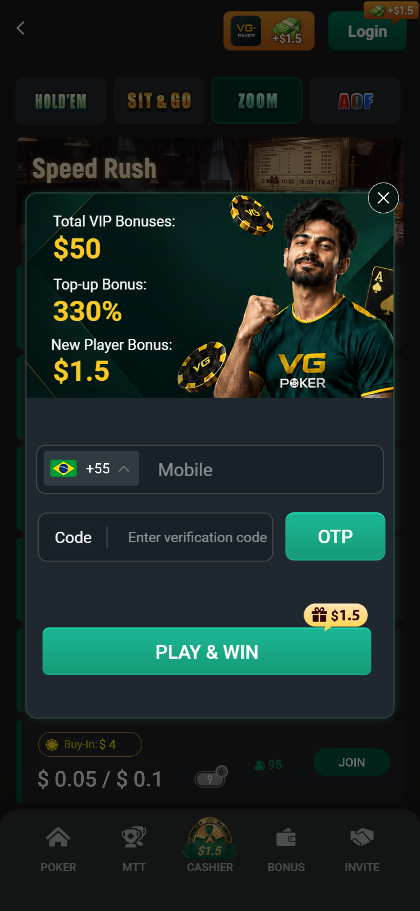
Login has one channel: mobile number. You enter your number, pick the country code, request the OTP, then type the verification code. There is no email login, no Google sign-in and no social login on this screen. If you are used to accounts that accept several methods, this is the one place the browser version is narrower than you might expect.
The country code selector is where you confirm you are on the right region. For players in Brazil, India and Vietnam the relevant codes are already in the list.
The new player bonus on the login screen
The sign-up panel shows three figures before you even finish logging in: a $1.50 new player bonus, a 330% top-up bonus, and $50 in total VIP bonuses. The $1.50 is flagged directly on the PLAY & WIN button, which makes it the first thing a new account receives.
The lobby banner runs a separate promotion, a first deposit bonus advertised at up to 180%. These are two different offers aimed at two different moments, so read the terms on the page rather than assuming they stack.
What is actually in the lobby
The poker section lists four game types, each with its own buy-in floor:
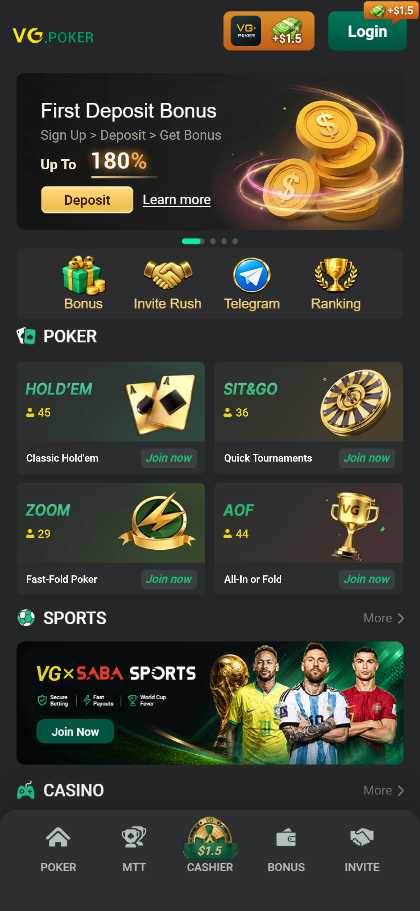
HOLD'EM. Standard no-limit cash tables, listed from a $45 buy-in floor. This is the game most players mean when they say poker.
SIT & GO. Short-handed tournaments that start as soon as the seats fill, from a $36 buy-in floor. No scheduled start time, so you are not waiting for a clock.
ZOOM. Fast-fold poker, from a $29 buy-in floor. You fold, and the table immediately deals you into a new hand against new opponents instead of making you wait for the current one to finish.
AOF. All-in or Fold, from a $44 buy-in floor. Every decision is compressed to two options, which makes it the fastest format in the lobby and also the highest variance.
Below the poker section the lobby also carries a sportsbook and a casino section, reachable from the same screen. The bottom navigation has five tabs: POKER, MTT, CASHIER, BONUS and INVITE. Everything you need to deposit, claim a promotion or invite a friend sits in that bar.
ZOOM tables: the stakes you will actually see
The ZOOM tab opens a list of running tables with the buy-in, the blinds, the number of players seated and a join button. The spread runs from micro stakes to mid stakes:
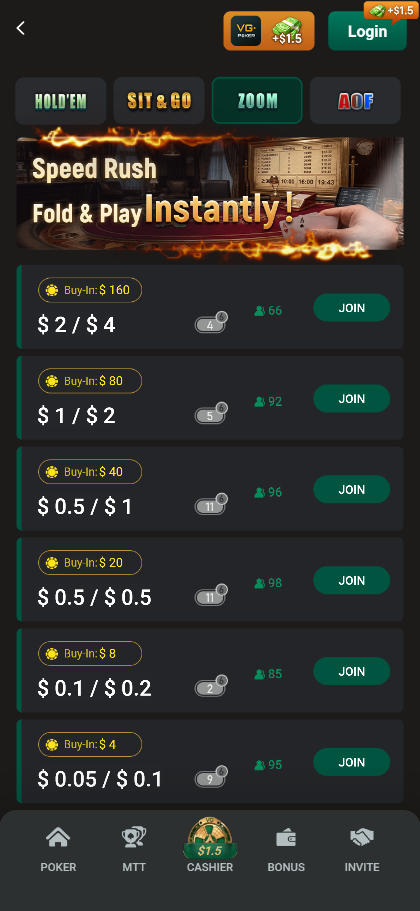
At the bottom, $0.05/$0.10 blinds with a $4 buy-in. Above that, $0.10/$0.20 with $8, then $0.50/$0.50 with $20, $0.50/$1 with $40, $1/$2 with $90, and at the top $2/$4 with a $160 buy-in. Six tiers in one list, so a new account can start at the lowest tier and move up without changing screens. That bottom tier is what makes this a practical place to play real money poker online for the first time: the buy-in is four dollars, not forty.
Daily freerolls, named by time zone
The Freeroll tab is the one worth opening first, because it is free and it is daily. Four freerolls run every day, each one named after a city so you can tell at a glance which time slot suits you: Berlin at 18:00, Rio at 00:00, Manhattan at 06:00 and New Delhi at 11:30.
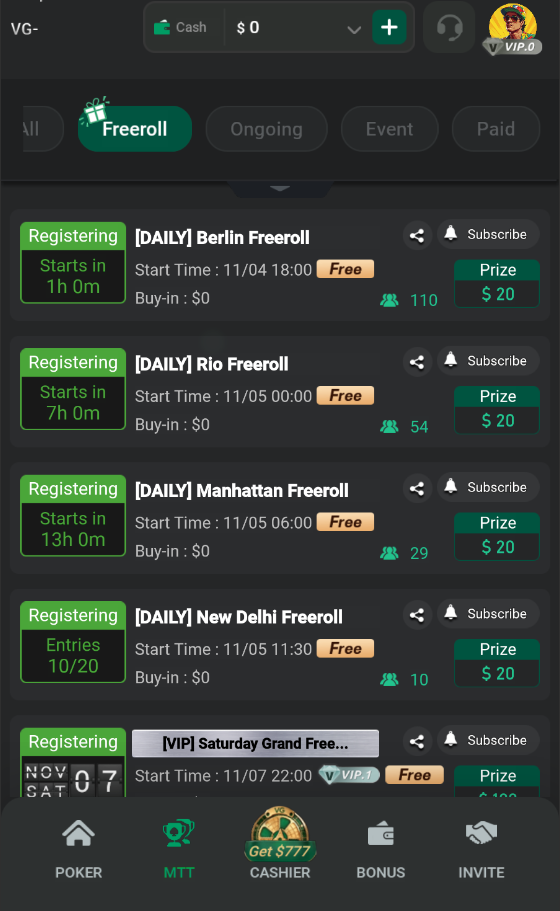
Each of those carries a $20 prize pool with a $0 buy-in, and entry counts in the screenshot ranged from 276 to 493 players, so the fields are small enough to be winnable. There is also a weekly [VIP] Saturday Grand Free with a $100 prize pool, which is the largest free event listed.
For a new account the practical meaning is that you can play a real tournament on the same day you register, at no cost, without waiting for a promotional window. The city naming is not decoration: it spreads the four free events across the day so that some region always has one starting soon.
Paid tournaments and the late registration window
The MTT tab lists tournaments under five filters: All, Freeroll, Ongoing, Event and Paid. Each row shows the buy-in, the start time, the current number of entrants and the prize pool.
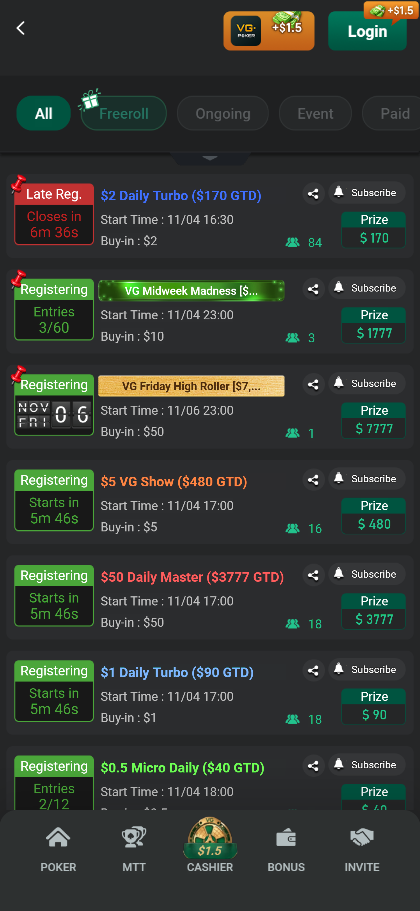
On a single day the paid schedule ran from a $1 Daily Turbo with $90 guaranteed and a $2 Daily Turbo with $170 guaranteed, through a $5 VG Show with $480 guaranteed, an $8 40BB Bitz with $720 guaranteed and a $10 VG Big with $840 guaranteed, up to a $50 Daily Master with $3,777 guaranteed. A $10 Milestone Madness carried a $1,777 prize pool.
Two things follow from that list. First, there is a genuine low-stakes entry point, so a new account is not forced into a $50 buy-in to play a tournament. Second, the schedule runs daily rather than weekly, which matters if you want to play a fixed session rather than wait for a weekend.
Late registration is shown with a live countdown. Each tournament row carries one of four status labels: Registering, Running, Late Reg, or Finished. When a tournament is already under way, the Late Reg label counts down in minutes and seconds, so you can see exactly how long you have left to join rather than guessing.
What the app still does better
The app is not redundant, and the browser version says so itself with a download prompt offering extra bonus. Three differences are worth knowing before you choose.
The extra bonus. The app advertises $5 or more in additional bonus on top of what the browser gives you. If the bonus matters more to you than the convenience of not installing, that is a straightforward reason to download.
Push notifications. A scheduled tournament has a start time. An installed app can notify you; a browser tab generally cannot do so reliably, particularly on iOS. If you play the daily schedule, this is the difference between catching a tournament and missing it.
Screen space and connection handling. On a phone, a browser shares vertical space with its own interface, which gets tight when you want more than one table. And an app tends to hold a session through a brief network drop more gracefully than a tab, which may need a manual reload.
Which one to use
Use the browser when you want to play without committing to an install, when you are on a device that is not yours, or when you want a quick session on the micro ZOOM tables. Use the app when you chase the extra bonus, when you need the start-time notification for a tournament, or when you play long sessions on mobile data.
A note on freerolls specifically. The daily free poker tournaments are the cheapest way to learn tournament pacing, and nothing about them requires an install. If the reason you are hesitating is that you do not want to commit to an app just to try a tournament, the browser version covers that case completely.
There is no penalty for using both. The account is the same, so switching between them does not mean managing two balances.
Questions about playing without the app
Do I need a separate account for the browser version?
No. It is the same account, and the same mobile number logs in to both. Your balance is not duplicated or split between the two.
Can I deposit and withdraw from the browser?
Yes. The CASHIER tab in the bottom navigation opens the same cashier the app uses. The steps are the same; only the container you are running in changes.
Can I log in with email or Google?
Not on the browser login screen, which offers mobile number and OTP only. If you expected an email or social login option, that is the one limitation to plan around.
Why does the page stay on a loading screen?
The usual cause is opening the link from inside another app. Browsers embedded in social and messaging apps often block this kind of page. Copy the link and paste it into Safari, Chrome, Edge or Firefox directly.
Are the bonuses the same as in the app?
The login bonus and the top-up promotion are the same account-level offers. The app adds a separate download incentive on top, which the browser version does not carry. Promotions change, so confirm the current terms on the page before you deposit.